Patrick Yee
IQAir Air Quality Data to Data Warehouse
ETL, Python, SQL, REST API
Overview
Note: I have used Python as the ETL tool in this project. I do not suggest to do this on a large scale, as Python was not designed for ETL. I only did this because ETL tools are typically not free to use and to show that Python is capable of achieving the final result
The goal of this project is to pull up to date data regarding air quality index (AQI) for a selected list of cities and transfer that data into our data warehouse.
I have decided to use data from IQAir (https://www.iqair.com/) as they are a leader in the industry tracking this information and they have a simple light REST API that is free to use and most importantly completely covers the final goal.
All of the following data is from IQAir’s platform.
Technologies and Software
- Python: I will use Python to orchestrate the entire ETL flow including: execute SQL scripts, call the REST API, and process the response message.
- PostgreSQL: I have installed PostgreSQL database on my local computer. This can be easily transferred to a server. I will also use tables to store my data, functions, sequences and procedures to process and clean my data.
- Postman: I will use Postman to first test IQAir’s API, analyze the request message parameters and response message structure.
- Pycharm: I will use this Python IDE to test Python Scripts.
- Dbeaver: I will use Dbeaver as my database tool to connect to my PostgreSQL database.
Steps
1. Call a test request message to the IQAir’s REST API using Postman
Accoring to the documentmation on IQAir’s API (https://API-docs.iqair.com/?version=latest) I will use Postman to call the API named “Get specified city data”. The sample request call reads as follows:
curl --location -g --request
GET 'http://API.airvisual.com/v2/city?city=Chengdustate=Sichuan&country=China&key={{YOUR_API_KEY}}'{
"status": "success",
"data": {
"city": "Chengdu",
"state": "Sichuan",
"country": "China",
"location": {
"type": "Point",
"coordinates": [
104.0570029,
30.65547329999999
]
},
"current": {
"weather": {
"ts": "2022-01-02T09:00:00.000Z",
"tp": 11,
"pr": 1021,
"hu": 51,
"ws": 1.09,
"wd": 130,
"ic": "04d"
},
"pollution": {
"ts": "2022-01-02T08:00:00.000Z",
"aqius": 161,
"mainus": "p2",
"aqicn": 100,
"maincn": "p2"
}
}
}
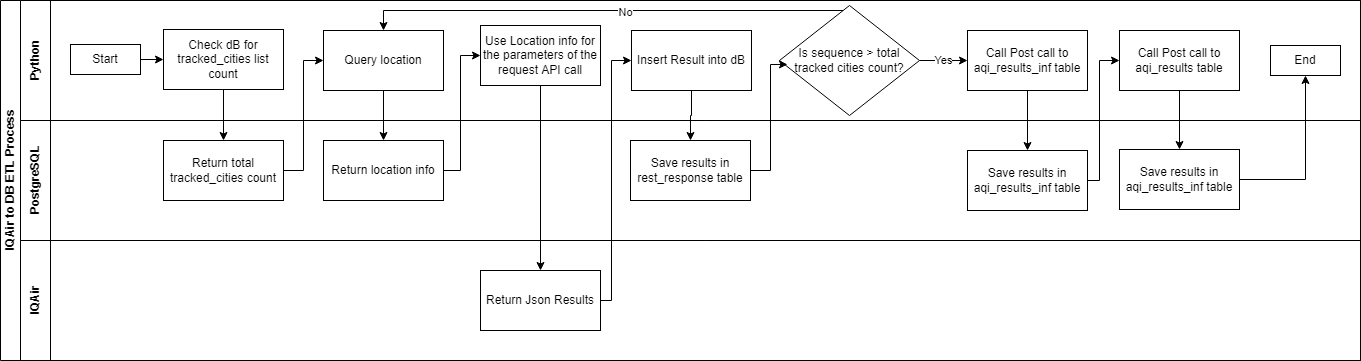
}2. Create a swim lane process flow of the ETL procedure
3. Create a schema named weather in PostgreSQL database
I want to create a new schema to store all my tables, functions, procedures and sequences. Use the following:
CREATE SCHEMA weather AUTHORIZATION postgres;
/*My username is postgres*/
4. Create the tables needed in PostgreSQL database
I will create 4 tables:
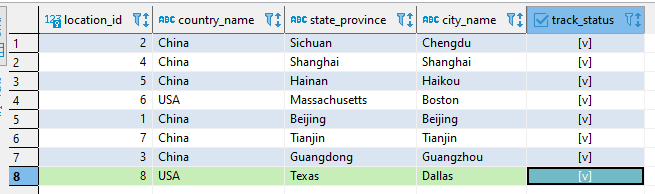
- weather.tracked_cities: I will use this table to store all the locations I want to query from the API. The basis of this table is what parameters are required to successfully make an API call to IQAir’s API.
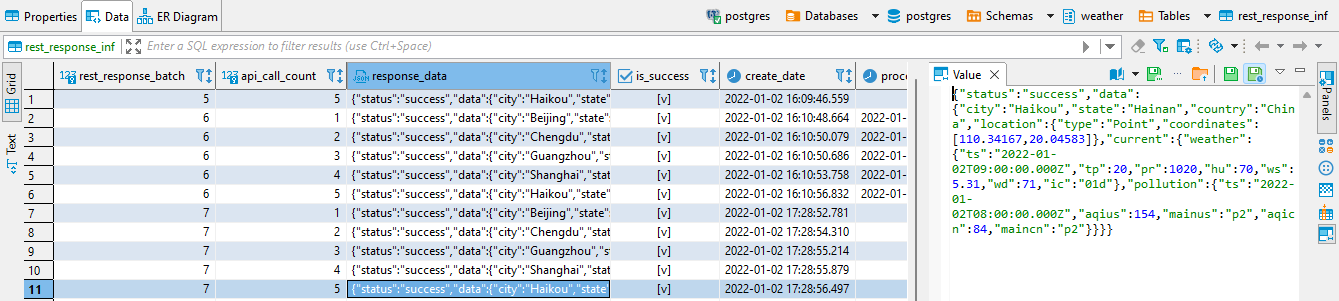
- weather.rest_response_inf: I will use this table to handle the raw json response from the API
- weather.aqi_results_inf: I will use this table to insert the results in a table-ized structure of the results from each batch of API calls. The basis of this table is based on analyzing the structure of the response of the API call.
- weather.aqi_results: I will use this table to store the final and most updated results while making sure no duplicates enter the table. The basis of this table is based on analyzing the structure of the response of the API call.
CREATE TABLE weather.tracked_cities (
	location_id int4 NOT NULL,
	country_name varchar(255) NOT NULL,
	state_province varchar(255) NOT NULL,
	city_name varchar(255) NOT NULL,
	track_status bool NOT NULL DEFAULT true,
	CONSTRAINT tracked_cities_pk PRIMARY KEY (location_id)
);
CREATE TABLE weather.rest_response_inf (
	rest_response_batch int4 NOT NULL,
	API_call_count int4 NOT NULL,
	response_data json NULL,
	is_success bool NULL,
	create_date timestamp NULL,
	process_date timestamp NULL,
	CONSTRAINT rest_response_inf_pk PRIMARY KEY (rest_response_batch, API_call_count)
);
CREATE TABLE weather.aqi_results_inf (
	location_city varchar NOT NULL,
	location_state varchar NOT NULL,
	location_country varchar NOT NULL,
	collection_date timestamptz NOT NULL,
	aqi_us float8 NULL,
	main_us varchar NULL,
	aqi_cn float8 NULL,
	main_cn varchar NULL,
	interface_status varchar NULL,
	create_date timestamp NULL,
	process_date timestamp NULL,
	interface_error varchar NULL,
	interface_batch int4 NOT NULL,
	CONSTRAINT aqi_results_inf_pk PRIMARY KEY (collection_date, location_city, location_state, location_country, interface_batch)
);
CREATE TABLE weather.aqi_results (
	location_city varchar NOT NULL,
	location_state varchar NOT NULL,
	location_country varchar NOT NULL,
	collection_date timestamptz NOT NULL,
	aqi_us float8 NULL,
	main_us varchar NULL,
	aqi_cn float8 NULL,
	main_cn varchar NULL,
	CONSTRAINT aqi_results_pk PRIMARY KEY (location_city, location_state, location_country, collection_date)
);
5. Create a sequence in PostgreSQL database
I want to create a unique “batch” number to track the batch of API calls. This will be useful for querying and debugging if there are issues in the future.
Sequences are good for this use as it will only use the next available number and should not have any issues with duplicates.
I will call this sequence “rest_response_batch”.
rest_response_batch:
CREATE SEQUENCE weather.rest_response_batch
	INCREMENT BY 1
	MINVALUE 1
	MAXVALUE 9223372036854775807
	START 1
	CACHE 1
	NO CYCLE;
6. Create Functions in PostgreSQL database
I will create 2 functions for this process:
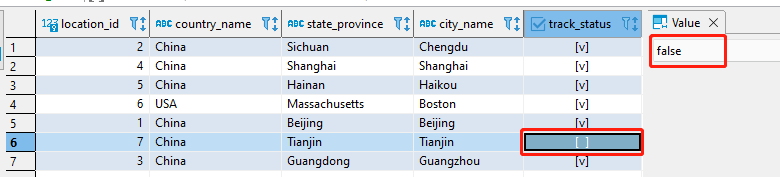
- weather.count_cities: I use this function to count the total number of locations that will be queried in one API batch. In this function I will disclude ‘where tracked_cities.track_status is false’. This field will be used to disable this location from future querying without hard deleting the entry from the table.
- weather.get_location(int4): I will use this function to get the country, state, and province. This function requires a single parameter: int4 which will in effect act as the row number or the sequence number
CREATE OR REPLACE FUNCTION weather.count_cities()
RETURNS integer
LANGUAGE plpgsql
AS $function$

declare
total_count int4;

BEGIN


/* select total count */
select count(location_id) into total_count
from weather.tracked_cities
where track_status  is true;

return total_count;

	END;
$function$
;
CREATE OR REPLACE FUNCTION weather.get_location(cur_row integer)
RETURNS character varying
LANGUAGE plpgsql
AS $function$

declare
v_location_name varchar;

BEGIN


/* get new country state and province */
with a1 as (
select concat(country_name,'/',state_province,'/',city_name) location_name,row_number () over (order by location_id) rn
from weather.tracked_cities
where track_status  is true
)
select location_name into v_location_name from a1  where rn=cur_row;


return v_location_name;

END;
$function$
;
7. Create Procedures in PostgreSQL database
I will create 2 procedures for this process:
- weather.post_aqi_results_inf: After all API calls are inserted into the weather.rest_response_inf table. I will use this procedure to query the raw json and insert the data into the weather.aqi_results_inf table. This procedure requires a single parameter: int4 which is the rest_response_batch from the sequence that ties this group of API calls together.
- weather.post_aqi_results: After the data is inserted into the weather.aqi_results_inf table. I will use this procedure to insert the data from weather.aqi_results_inf to the weather.aqi_results table while ensuring no duplicate data exists in the weather.aqi_results table. This procedure requires a single parameter: int4 which is the rest_response_batch from the sequence that ties this group of API calls together.
CREATE OR REPLACE PROCEDURE weather.post_aqi_results_inf(IN cur_batch integer)
LANGUAGE plpgsql
AS $procedure$
	BEGIN


insert into
weather.aqi_results_inf (
location_city,
location_state,
location_country,
collection_date,
aqi_us,
main_us,
aqi_cn,
main_cn,
interface_status,
create_date,
process_date,
interface_error,
interface_batch)
		select
		data_section->>'city' as location_city,
		data_section->>'state' as location_state ,
		data_section->>'country' as location_country,
		(pollution_section->>'ts')::timestamptz as collection_date,
		(pollution_section->>'aqius')::float8 as aqi_us,
		pollution_section->>'mainus' as main_us,
		(pollution_section->>'aqicn')::float8 as aqi_cn,
		pollution_section->>'maincn' as main_cn,
		'I' interface_status,
		current_timestamp create_date,
		null process_date,
		null interface_error,
		cur_batch interface_batch
		from
		(select (response_data->'data') as data_section,
		(response_data->'data'->'current'->'pollution') as pollution_section
		from weather.rest_response_inf rri
		where
		rest_response_batch=cur_batch
		and is_success is true) raw_data;

UPDATE weather.rest_response_inf
SET process_date=current_timestamp
WHERE rest_response_batch=cur_batch
AND is_success is true;

	END;
$procedure$
;
CREATE OR REPLACE PROCEDURE weather.post_aqi_results(IN cur_batch integer)
 LANGUAGE plpgsql
AS $procedure$
	BEGIN

update weather.aqi_results_inf
set interface_status='P'
where interface_batch=cur_batch;

insert into
weather.aqi_results (
location_city,
location_state,
location_country,
collection_date,
aqi_us,
main_us,
aqi_cn,
main_cn)
	select
	location_city,
	location_state,
	location_country,
	collection_date,
	aqi_us,
	main_us,
	aqi_cn,
	main_cn
	from weather.aqi_results_inf ari where interface_batch = cur_batch

ON CONFLICT ON constraint aqi_results_pk
DO UPDATE SET
aqi_us=excluded.aqi_us,
main_us=excluded.main_us,
aqi_cn=excluded.aqi_cn,
main_cn=excluded.main_cn;


update weather.aqi_results_inf
set interface_status='S',
process_date =current_timestamp
where interface_batch=cur_batch;


	END;
$procedure$
;
8. Write the Python Script to tie everything together
I have written the following script to orchestrate this entire ETL process. Please refer to the swim lane diagram for reference as well as comments within the Python script with the filename: aqi_to_dB_V1.py
aqi_to_dB_V1.py:
import psycopg2
import pandas.io.sql as psql
import sys
import configparser
import requests


get_count = 'select weather.count_cities()'
get_rest_response_batch = "select nextval('weather.rest_response_batch');"


## connect to local dB stored in an .ini folder.  this is best practice to reuse thesee credentials in other scripts:
## content of db_local.ini:
##[local]
##host=localhost
##dbname=postgres
##user=postgres
##password=password


config_parser  = configparser.ConfigParser()
db_loc='K:\scripts\db_credentials\db_local.ini'
config_parser.read(db_loc)
section_name ='local'

## Check if section exists in .ini file.  If not go to else statement
if (config_parser.has_section(section_name)):
	config_params=config_parser.items(section_name)
	db_conn_dict = {}
	for config_param in config_params:
		key = config_param[0]
		value = config_param[1]
		db_conn_dict[key] = value

	# connect to dB
	connection = psycopg2.connect(**db_conn_dict)
	print('connection successful')

	#create a batch number that all api_requests and responses will fall under
	df_batch = psql.read_sql(get_rest_response_batch, connection)
	batch = df_batch["nextval"].loc[0]

	#get the count of locations to API calls we need to make based on number of locations
	df_count = psql.read_sql(get_count, connection)
	total_count=df_count["count_cities"].loc[0]

	#row number acts as the parameter when using the weather.get_location(int4) function
	row_number =1

	# use the while statement to compare the number required api calls vs the row_number we are currently on in the loop
	while (row_number <= total_count):

		#execute the get_location function
		get_location = f'select weather.get_location({row_number});'
		df_location = psql.read_sql(get_location, connection)
		cur_location = df_location["get_location"].loc[0]
		location_list=cur_location.split('/')

		#split the string from the get_location function. split by the delimiter '/'
		v_country=location_list[0]
		v_state=location_list[1]
		v_city=location_list[2]

		# I have stored my api key in the below txt file.  "Community" features are free if you register
		with open (r"K:\scripts\api_credentials\aqi_api_key.txt", "r") as myfile:
			api_key=myfile.read()

		# Get call to IQAir's API
		request_url='http://api.airvisual.com/v2/city'
		v_params = {'city': v_city, 'state': v_state, 'country': v_country,'key':api_key}
		r = requests.get(request_url, params=v_params)

		# raw json response
		json_respone=r.text

		# insert to the rest_response_inf table
		insert_script=f'''INSERT INTO weather.rest_response_inf
		(rest_response_batch, api_call_count, response_data, is_success, create_date)
		VALUES({batch}, {row_number}, '{json_respone}', true, current_timestamp);'''
		cursor = connection.cursor()
		cursor.execute(insert_script)

		# use commit to save the results.  Please note after you commit you will not have a way to rollback
		connection.commit()
		print(f"Records inserted........{row_number}")

		#go to next location by reassigning the row_number by an increment of 1
		row_number = row_number + 1

	# call the post_api_results_inf and post_api_results procedures
	cursor.execute(f'call weather.post_aqi_results_inf({batch})')
	cursor.execute(f'call weather.post_aqi_results({batch})')
	connection.commit()
	connection.close ()

#if section does not exists then throw this error
else:
	connection.close ()
	raise Exception(f'{section_name} is missing from {db_loc}')
9. Test out everything together
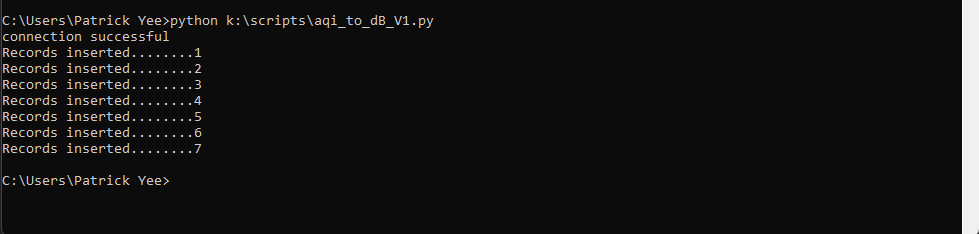
Run this script in Pycharm or in command console by executing the following command:
replace the directory with where ever you have saved your python script
python k:\scripts\aqi_to_dB_V1.py

10. Schedule task in Windows Task Scheduler
Optional Step: This process still requires to actually manually run the Python script. If you are using windows you can use Windows Task Scheduler to automate this process. I will not explain how to set this up as there is extensive information on how to set this up on the web. I simply watched this YouTube tutorial (https://youtu.be/cjBPnIXK60U). Credit to ritvikmath (https://www.youtube.com/channel/UCUcpVoi5KkJmnE3bvEhHR0Q)
Results
Everytime the Python script is run it will post the most recent data into the weather.results_aqi table table. This is the same table that I would pull data from to make visualizations or reports.
In terms of scalability, this can be scaled based on 3 facets:
- I can easily add a location by adding it to the weather.tracked_cities table. After I add a location it will be included in the next API call. I do not need to alter my code in anyway
- I can easily remove a location by setting tracked_cities.tracked_status to false. After I set a location’s tracked_status to false, the location will be not included in the next API call
- As you can see from the documentation of the IQAir’s website () all of their API calls responses are in json format. Based on this I could reuse weather.rest_response_inf table and some of the logic. Although, as response data differs from different API calls, the PostgreSQL procedures would have to be custom made per API call.